Remediation Hub (9)
Split Sidekiq into Fast Critical/High & Background Default/Low Pods
Running two lightweight Sidekiq containers—one dedicated to critical/high queues and one for mailers/low—keeps live chat delivery sub-second.
Pod A: -q critical,6 -q high,4 | Pod B: -q default,3 -q mailers,2 -q low,1
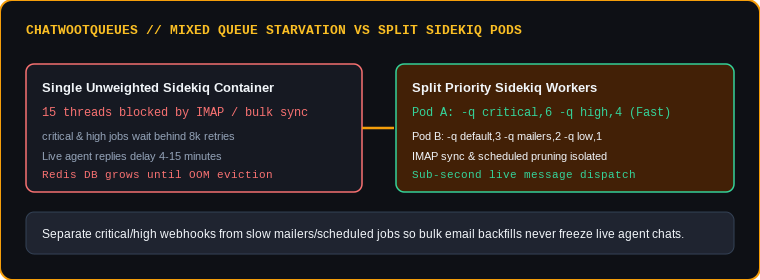
Eliminating Queue Head-of-Line Blocking
When a team imports 50,000 legacy contacts or hits an IMAP folder stall, a unified Sidekiq worker pool drains all concurrency on low-priority jobs. Splitting into sidekiq_fast (critical, high) and sidekiq_bulk (default, mailers, low, scheduled_jobs) guarantees live customer replies always run immediately.
Sizing Memory Limits Across Both Worker Containers
On a 16 GB Hostinger KVM 4 node, allocate mem_limit: 1800m (concurrency 12) to sidekiq_fast and mem_limit: 2200m (concurrency 10) to sidekiq_bulk, both with LD_PRELOAD jemalloc enabled.
Measured Thresholds & Configuration
| Sidekiq Service | Queues Served | Target Latency |
|---|---|---|
| sidekiq_fast | -q critical,6 -q high,4 | < 250 ms live message dispatch |
| sidekiq_bulk | -q default,3 -q mailers,2 -q low,1 | Background IMAP, exports, pruning |